How I Built an AI Shopping Assistant with Corrective RAG on AWS
From a 19,000-product eBay dataset to a deployed, talk-or-type shopping assistant that never makes up a price
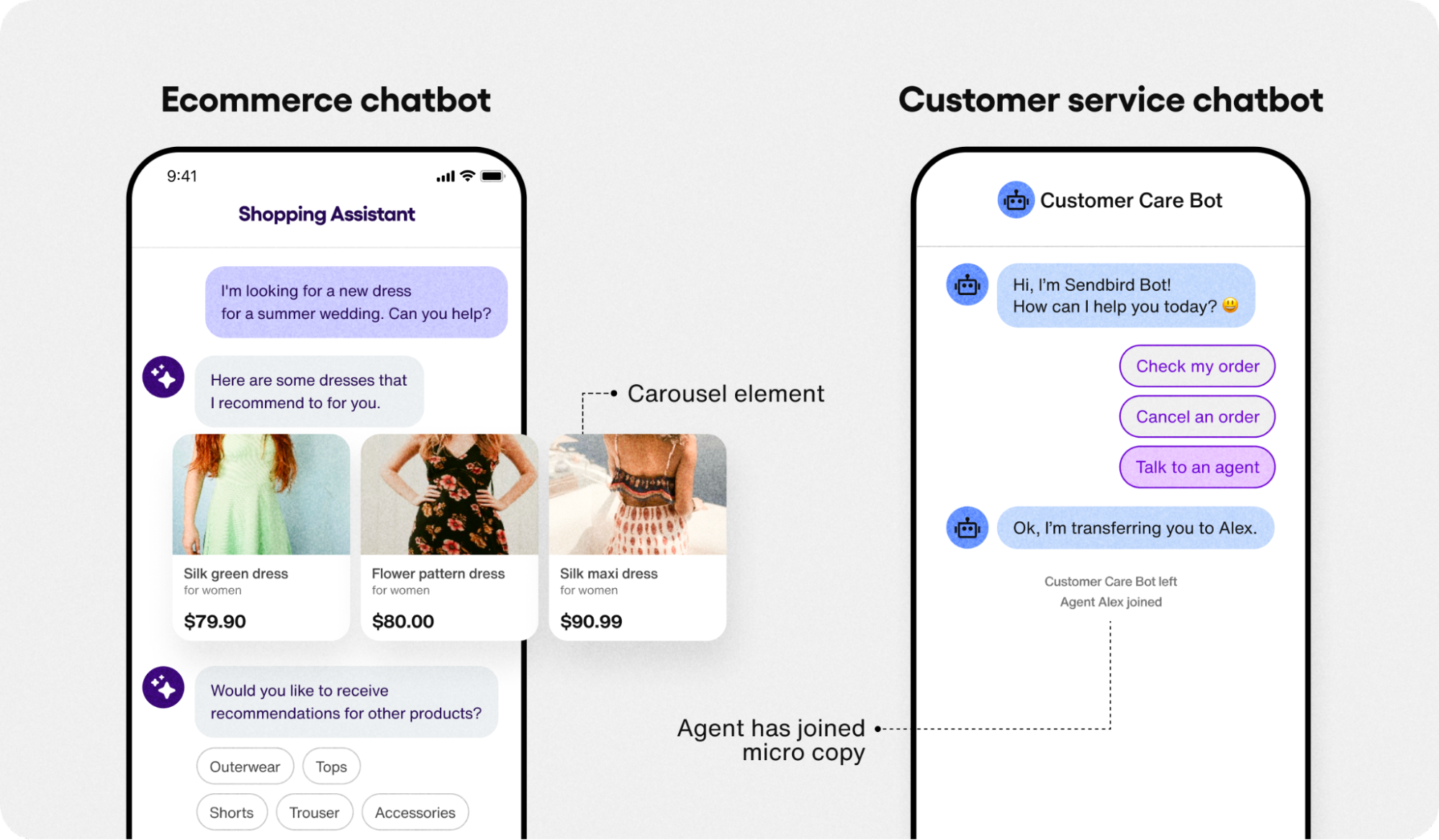
Most online shopping search bars are dumb in a very specific way: type "cheap red dress" and you get either zero results or five hundred, sorted by something that has nothing to do with what you actually meant. I wanted to fix that — not with a bigger search bar, but with an AI layer that actually understands what you're asking for, remembers what you said two messages ago, and never lies to you about a price.
So I built an AI Shopping Assistant on top of a real dataset of 18,992 eBay fashion listings. You can type to it or talk to it. You can say "show me women's dresses under $50 in good condition" and it filters by real price and real condition, not just keywords. You can follow up with "anything cheaper?" and it remembers the conversation. And critically — it is built on Corrective RAG (CRAG), which means it double-checks its own retrieval before it ever lets the language model open its mouth.
This post walks through exactly how it works, why I chose Corrective RAG over plain RAG, the full AWS architecture behind it, and what it cost to run.
What the Assistant Can Actually Do
Before getting into the architecture, here's the experience from the user's side — because that's the part that actually matters first.
- Type or talk — there's a microphone button right in the chat box. Tap it, speak naturally, and your voice is transcribed and sent just like a typed message, using the browser's built-in speech recognition.
- Budget-aware search — "under $30," "between $20 and $40," "good condition only" — these aren't just keywords floating in a query, they get extracted and applied as real filters against actual product prices and conditions.
- Conversation memory — the assistant keeps the last few turns of context, so "do you have that in blue?" or "anything cheaper?" works the way it would with a human shop assistant.
- Honest answers, always — the model is only allowed to talk about products that were actually retrieved from the dataset. No invented prices, no invented items, no confidently wrong answers.
- A clean, familiar interface — a ChatGPT-style chat feed with product cards, responsive on both desktop and mobile.
That last bullet point — "honest answers, always" — is the whole reason this project exists. Let me explain why that's harder than it sounds.
Why Corrective RAG Instead of Plain RAG
Standard Retrieval-Augmented Generation (RAG) has a quiet flaw that doesn't show up until you actually use it under real conditions: it retrieves some documents, hands them to the language model, and trusts that the retrieval was good. If the retrieval was actually bad — wrong category, stale results, an embedding mismatch — the language model usually doesn't notice. It just generates a fluent, confident answer based on garbage. That's not a hallucination in the classic sense; it's worse, because it sounds grounded.
Corrective RAG (CRAG) inserts a checkpoint exactly where that failure happens. Before the language model is allowed to generate a final answer, the system asks a very direct question: are these retrieved results actually relevant to what the user asked? If the answer is no, the query gets rewritten and the search runs again — the model never gets the chance to confidently narrate a bad retrieval as fact.
For a shopping assistant specifically, this matters a lot. If someone asks for "men's running shoes under $40" and the vector search pulls back a women's handbag because the embedding space got a little confused, a plain RAG system might still describe that handbag as a great match. CRAG catches that before it reaches the user.
The Workflow: From Query to Grounded Answer
Here is the exact five-step pipeline that runs every time someone sends a message, whether it came in by voice or by text:
1. Intent Detection
The very first thing that happens is a cheap, fast classification: is this message a greeting or small talk, or is it an actual product search? There's no point running a full vector search pipeline on "hi there" — that gets a conversational reply immediately, while anything that looks like a real query moves forward.
2. Query Rewriting
This step runs the user's raw message through Amazon Nova Micro to clean it up before it ever touches the search index. Typos get fixed, abbreviations get expanded, and key attributes — gender, color, size, price ceiling, condition — get explicitly pulled out. If there's conversation history, follow-up questions like "anything cheaper?" get resolved against the previous turn. A query like "show me cheap womens dress" effectively becomes a structured, searchable version of itself: women's casual dress, budget-friendly.
3. FAISS Vector Search
The rewritten query is converted into a 1024-dimensional embedding using Amazon Titan Embeddings V2, and that vector is compared by cosine similarity against the embeddings of all 18,992 products in the dataset, using FAISS (Facebook AI Similarity Search) as the index. FAISS was the right call here specifically because the dataset is under 100,000 documents — a flat, in-memory FAISS index is simpler to deploy and reason about than spinning up a managed vector database for a dataset this size.
4. Post-Retrieval Filters
Semantic similarity alone isn't enough for shopping — a customer who says "under $50" means it, literally. So after the vector search returns its top candidates, hard filters are applied on top: category (shoes, bags, dresses, trousers, etc.), price ceiling or range, condition (new vs. used), and deduplication so the same listing doesn't show up twice under slightly different titles.
5. The Relevance Check, and Honest Generation
This is the actual "corrective" part of CRAG. The filtered results are evaluated for relevance before generation happens. If they don't hold up, the pipeline loops back to query rewriting and tries again with a refined version of the query. Once results pass that check, Amazon Nova Micro generates a short, honest response — two to three sentences — that only references what was actually retrieved, with real prices pulled straight from the dataset. No filling in gaps with plausible-sounding fiction.
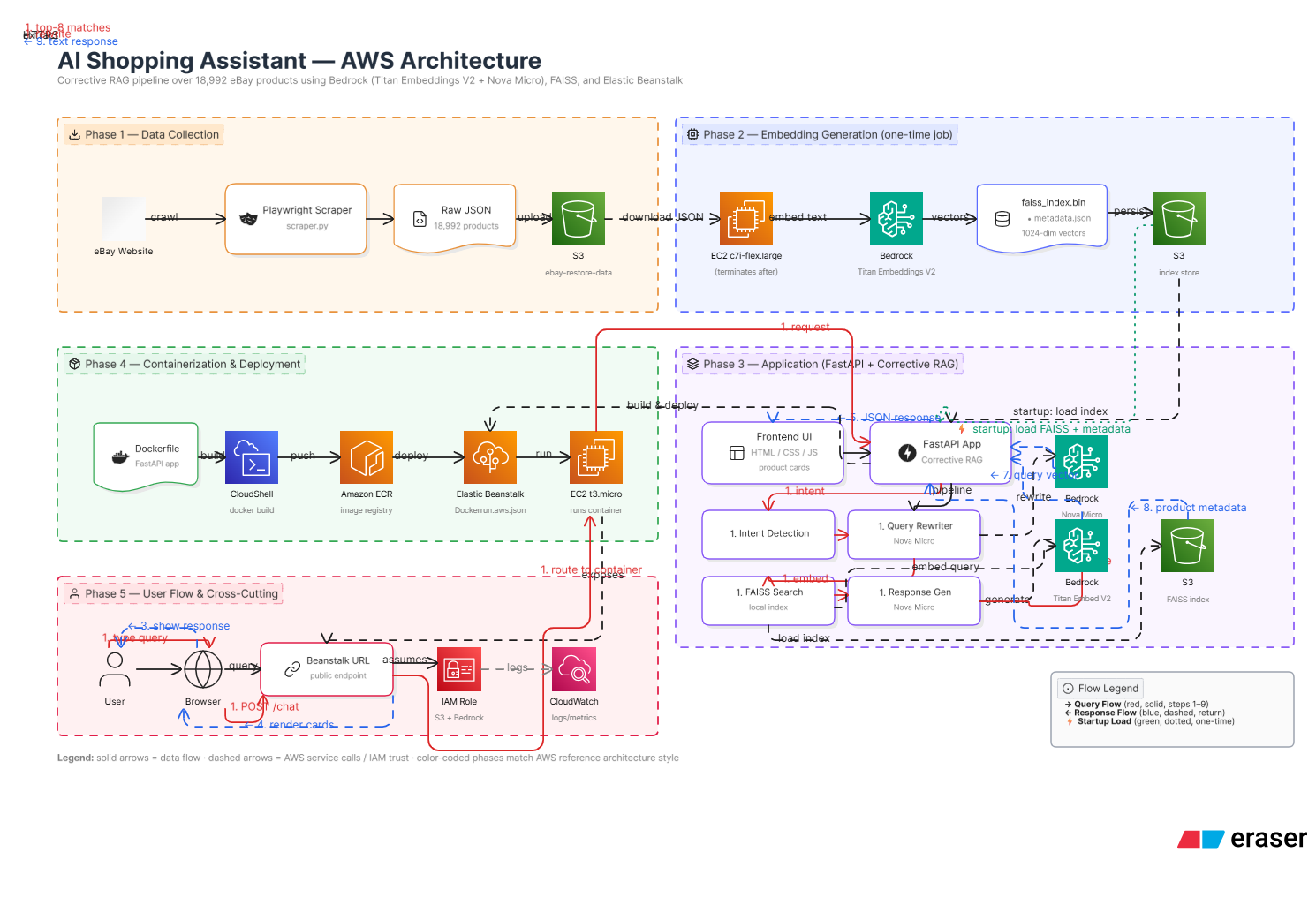
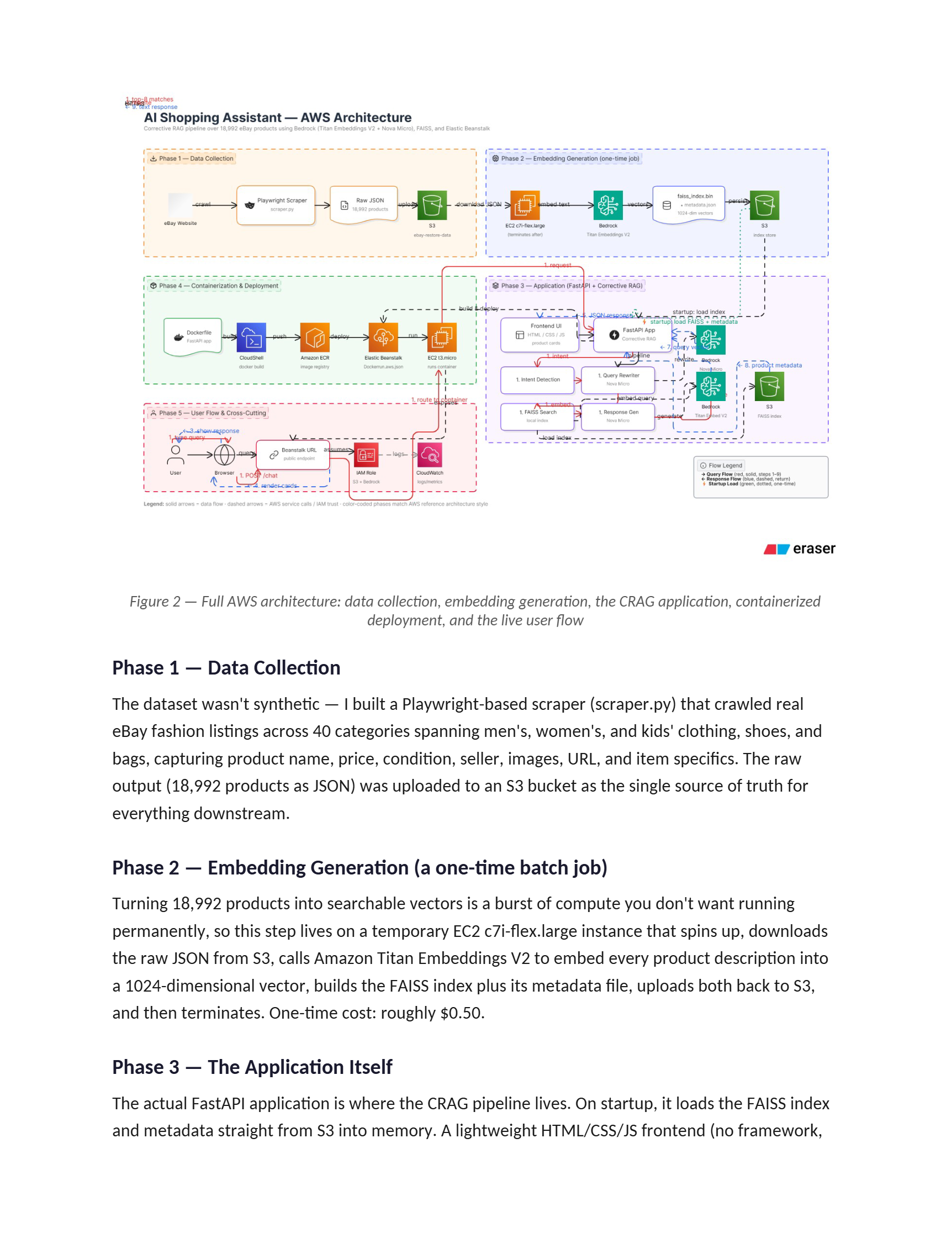
The Full AWS Architecture
Here's where the project moves from "an interesting RAG pipeline" to "a deployed application someone can actually use." I split the build into five phases: scraping and collecting the data, generating embeddings, building the application itself, containerizing and deploying it, and finally the live user flow with logging and permissions wired in.
Phase 1 — Data Collection
The dataset wasn't synthetic — I built a Playwright-based scraper that crawled real eBay fashion listings across 40 categories spanning men's, women's, and kids' clothing, shoes, and bags, capturing product name, price, condition, seller, images, URL, and item specifics. The raw output (18,992 products as JSON) was uploaded to an S3 bucket as the single source of truth for everything downstream.
Phase 2 — Embedding Generation (a one-time batch job)
Turning 18,992 products into searchable vectors is a burst of compute you don't want running permanently, so this step lives on a temporary EC2 c7i-flex.large instance that spins up, downloads the raw JSON from S3, calls Amazon Titan Embeddings V2 to embed every product description into a 1024-dimensional vector, builds the FAISS index plus its metadata file, uploads both back to S3, and then terminates. One-time cost: roughly $0.50.
Phase 3 — The Application Itself
The actual FastAPI application is where the CRAG pipeline lives. On startup, it loads the FAISS index and metadata straight from S3 into memory. A lightweight HTML/CSS/JS frontend (no framework, intentionally) sends user input — typed or voice-transcribed — to a /chat endpoint, which runs the full intent detection → query rewriting → FAISS search → filtering → generation pipeline and returns a JSON response with text and matching product cards.
Phase 4 — Containerization and Deployment
The whole FastAPI app is packaged into a Docker container defined by a single Dockerfile. From there, it's a standard container deployment pipeline: build the image, push it to Amazon ECR (Elastic Container Registry), and deploy it through AWS Elastic Beanstalk using a Dockerrun.aws.json config, which provisions and manages the underlying EC2 instance, load balancer, and health checks automatically. This is the part of the build that turns "code on my laptop" into "a URL anyone can open."
Phase 5 — User Flow and Cross-Cutting Concerns
On the live system, a user's browser talks to a public Beanstalk endpoint, which routes into the running container. The container assumes an IAM role scoped specifically to S3 and Bedrock access — no hardcoded AWS keys anywhere in the codebase. Logs and metrics flow into CloudWatch, which is what you'd actually want if you were running this for real users rather than just a portfolio demo.
AWS Services at a Glance
| Service | Role in the Project |
|---|---|
| Elastic Beanstalk | Hosts the Docker container; manages EC2, load balancing, and health checks |
| EC2 (t3.micro) | Runs the container inside Elastic Beanstalk |
| Amazon S3 | Stores the FAISS index, metadata, raw eBay data, and Docker build artifacts |
| Amazon ECR | Docker container image registry |
| Bedrock – Titan Embeddings V2 | Converts product text and queries into 1024-dim vectors |
| Bedrock – Amazon Nova Micro | Handles query rewriting, intent detection, and response generation |
| EC2 (c7i-flex.large) | One-time job that generates the FAISS embeddings, then terminates |
| IAM | Scoped roles and permissions for every service — no hardcoded credentials |
| CloudWatch | Logs and monitoring for the running application |
Tech Stack Summary
| Layer | Technology |
|---|---|
| Backend | Python, FastAPI, Uvicorn |
| Vector Search | FAISS (Facebook AI Similarity Search) |
| Embeddings | Amazon Titan Embeddings V2 (1024 dimensions) |
| LLM | Amazon Nova Micro, via AWS Bedrock |
| Frontend | Vanilla HTML, CSS, JavaScript with native browser speech recognition |
| Containerization | Docker |
| Cloud / Deployment | AWS — Elastic Beanstalk, S3, ECR, Bedrock, EC2 |
What It Actually Costs to Run
One of the things I wanted to prove to myself with this project was that you don't need a five-figure cloud bill to run a real AI application with a real vector index and a real LLM in the loop. Here's the actual monthly cost breakdown:
| Usage | Monthly Cost |
|---|---|
| Elastic Beanstalk (t3.micro) | ~$8 |
| S3 storage (~100MB) | ~$0.01 |
| ECR storage | ~$0.01 |
| Bedrock (10,000 queries) | ~$3 |
| Total | ~$11 / month |
What I Learned Building This
- Query rewriting carries more weight than the vector search itself. Adding the rewriting step before retrieval was the single change that improved relevant results the most — raw user queries are messier than you'd expect, and cleaning them up before embedding matters more than tuning the search index.
- You don't always need a managed vector database. For a dataset under roughly 100,000 documents, a flat, in-memory FAISS index loaded from S3 on startup is simpler, cheaper, and fast enough — no need to reach for a hosted vector DB by default.
- Correctness has to be designed in, not bolted on. The relevance check in CRAG isn't an afterthought — it's the entire reason the assistant can be trusted to talk about real prices instead of inventing them.
- Small, focused models can carry a surprising amount of the pipeline. Amazon Nova Micro handles intent detection, query rewriting, and final response generation — three distinct jobs — at a fraction of the cost of a larger model, because none of those jobs actually require heavyweight reasoning.
Try It Yourself
The live demo, the full architecture diagram, the complete source code, and step-by-step deployment instructions are all on my GitHub — every tool, technique, and configuration step used in this project is documented there, end to end.
If you're looking to build something similar — a RAG-powered knowledge system, an AI chatbot on your own data, or a full cloud deployment on AWS — see the services I offer →
🔴 Try the Live Demo | View Source on GitHub
Comments (0)
Be the first to comment.